
Be in the conversation.
Let your notetaker capture the meeting. Come back to the transcript, decisions, and action items when you're ready to follow up.
 inboxops
Meetings. Email. Tasks. Connected.
Less catching up.
More moving forward.
For client calls that turn into real work.
Meeting notes, the follow-up email, and the next task. Together.
Works with and
and

Good conversations deserve
a clear next step.
Capture the meeting Keep the context
 Move the work forward
The workspace
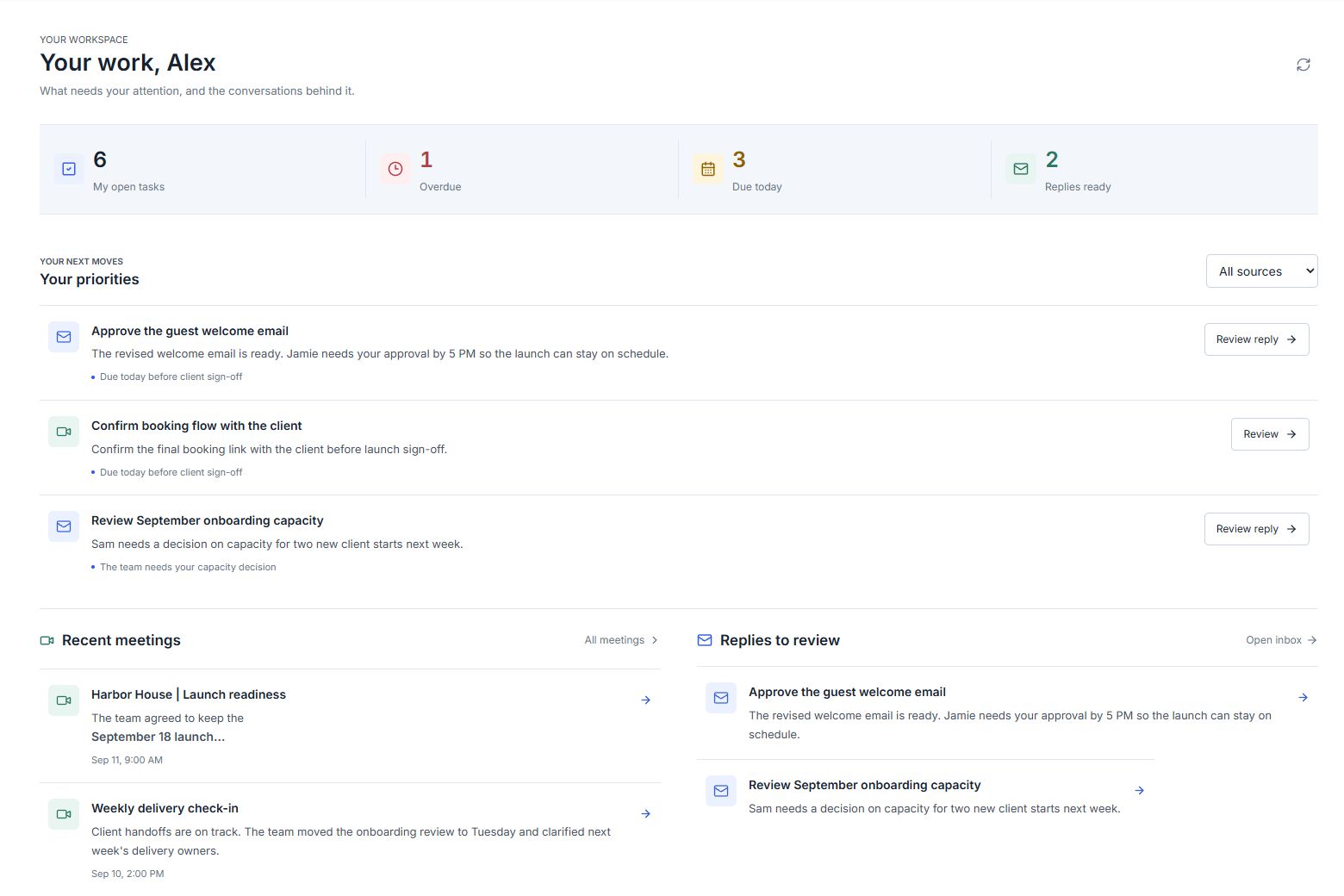
Start with what needs your attention.
Open the original conversation.
Take the next step, right there.
Open tasks, overdue work, recent meetings, and replies worth your attention.
Actual InboxOps screens. Sample workspace data.
From conversation to follow-through
For people whose days run on client calls,
team conversations, and the work in between.
Let your notetaker capture the meeting. Come back to the transcript, decisions, and action items when you're ready to follow up.
Read the original email alongside AI analysis. Review a suggested reply, make it yours, and send it from your connected inbox.
Give work an owner, a due date, and a place in a project. Keep the source conversation close when the details matter.
The details stay connected
You shouldn't have to search your inbox to remember why something landed on your list.

Open the linked email or meeting from the work it created.

Adjust the owner, update the date, or work on the reply with the context in front of you.

Bring related tasks into a project and keep the next steps organized.
The original email, right where you need itContext first. AI alongside it.
Assistance, without handing over the wheel
 Review suggested replies before you send Check the source behind a summary Choose your meeting recording preferences
You can connect a Google or Microsoft account for email and calendar. Access depends on the permissions you grant; a managed work account may also need your organization's approval.
No. The notetaker is one part of the workspace. InboxOps also brings together email, tasks, projects, and your calendar so you can work on what comes out of those conversations.
Yes. The inbox includes the original email body and formatting, alongside the analysis. You can choose whether to load external images.
Suggested replies are drafts for you to review and edit. You decide what to send.
Yes. Start with your own account and your own work. Team and project features are there when you need to collaborate.
Yes. Get a demo using a sample workspace to explore meeting notes, follow-up emails, and tasks. You don't need to connect your inbox or share client information.
Let participants know before recording and follow your organization's policies and the requirements that apply to the meeting. A notetaker doesn't replace your responsibility to obtain permission.
Get a demo
See how your meetings, email, and tasks come together. Tell us a little about your work, and we'll find a time to show you around.
No account connection needed. Sample data only.
Sign up now